

If you’re looking for a powerful and flexible website builder look no further than Webflow.
I will say though, the learning curve is a bit higher than other website builders like Framer or Squarespace. That said, if you have any hopes of your site eventually evolving into a more involved blog, eCommerce store, or membership site (aka anything meaningfully complex), you’d be happy you picked Webflow over the alternative website builders.
Webflow is even sometimes referred to as more of a “no-code web app builder” than it is that of a website builder. And with the recent users functionality released along with all the integrated tools, Webflow is definitely evolving into something a bit more than just a website builder.
If we were creating super basic marketing site or personal website, we might use Framer over Webflow. Even if we wanted to try building a site like this in Framer, it would begin falling apart with any scale.
Fun fact: This site, the one you’re on right now, was built in Webflow. It’s incredibly powerful, especially when matched with tools like Whalesync. Imagine being able to manage the site database for a site like this one via Airtable or Notion 🤯 Webflow is the king of integration!
Limitations
Now there’s one thing that Webflow is lacking, and that’s a proper website analytics tool for some reason 😅 that said, we find Fathom Analytics to be a fantastic pairing with Webflow if you’re looking for a modern website analytics and uptime monitoring tool.
The truth of the matter is that even if Webflow added a basic website analytics tool, we’d still continue using Fathom just for speed of accessing it, better control around conversion tracking, and storage of historical data.
Alternative CDN
Are you someone that wants to use Cloudflare for things like bot detection and general caching of your site? Yeah, us too—it’s a super reasonable request and technically even completely free (well, at least on the Cloudflare side of things).
Webflow decides to categorize this as an “enterprise feature” so to enable the Cloudflare proxy to stop bots and spam along with improved loading times with the global CDN that is Cloudflare, you’ll need to purchase the Webflow Enterprise tier (which starts at around $15k/yr (we’ve seen some people get it for around $8k/yr with barebones enterprise lite barebones functionality).
So yes, even if you’re like us and spending less than $600/yr on Webflow because you’re not needing any of the additional tier limits, they’ll tell you to head on over to the Enterprise tier in order to enable Cloudflare… Yeah, we’re pretty upset over it too.
Please just stop gatekeeping using Cloudflare proxy for your own fee (looking at you too Framer), please.
But I Enabled Cloudflare With Webflow
Yes, you did! And you’re going to get an expired SSL certificate error within the next 3 months when Webflow fails to realize that you’re using the auto-renewing Cloudflare SSL certificate instead.
So that’s where you need the Enterprise tier, to simply let Webflow know this here:
Webflow Pricing (Workspace plans)
Starter
Create up to 2 website projects. No code export.
Core
You can create up to 10 website projects and export your code.
Growth
The best plan for freelancers or designers, as you can create an unlimited amount of projects. Extended features.
Prices shown are monthly costs for yearly subscriptions of Webflow’s Account plans. You can also find more info on Webflow’s Site plans and Ecommerce plans here.
Webflow’s Pricing Options
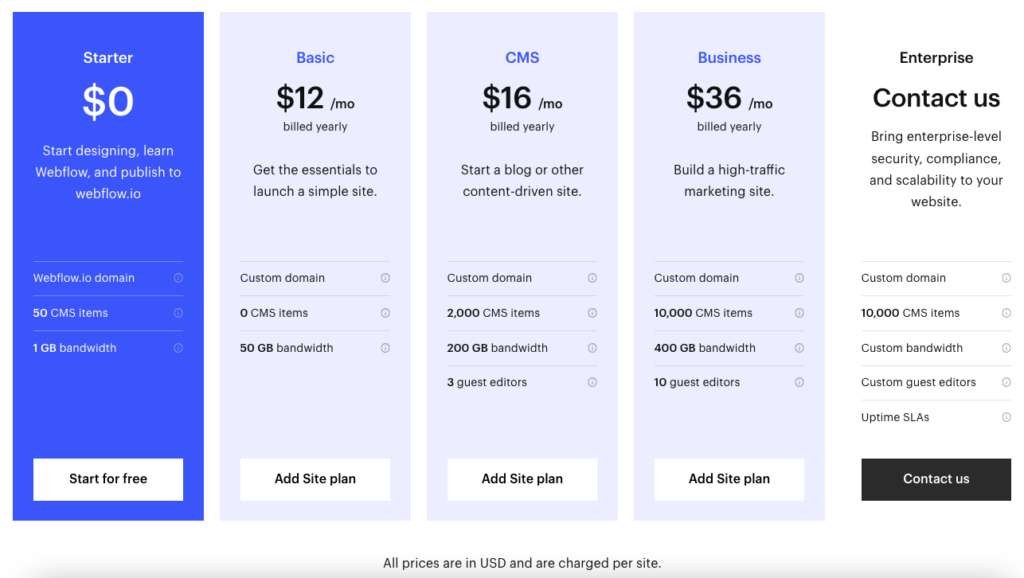
Webflow’s pricing can get a little confusing, but it’s useful to know that they offer two different types of plans, depending on your needs:
- Their Site plans are geared to users who need just one site and allow you to connect a custom domain
- Workspace plans are designed for agencies or freelancers who need multiple sites, but don’t come with hosting or a customized domain
Pros and Cons of Webflow
Pros
-
Lots of freedom to customize your site and access to your code
Webflow gives you full control over your website’s design – layouts, responsiveness, styling, and interactions; seriously powerful stuff! Furthermore you can embed your own HTML code and export your website’s code. You’re never locked in!
-
Great for client-work
Ideally suited to create websites for clients. The Account Plans even allow you to bill your clients right through Webflow and also add a markup.
-
Plenty of support materials
The tool isn’t exactly self-explanatory – which is why Webflow provides a great range of resources through their own Webflow University, in the form of courses, videos, articles and a user forum.
-
Guaranteed Uptime of 99.99%
Unlike any other website builder, Webflow guarantees a very high uptime via their Service Level Agreement (SLA). That means if they don’t reach it they’ll have to refund you.
-
Publish sites created in Figma
Prefer to design sites in Figma? That’s no problem. The Figma to Webflow plugin will convert your Figma design to HTML and CSS, delivering a Webflow website that’s ready to go live in minutes.
Cons
-
Not beginner-friendly
The trade-off for having such a powerful and versatile tool is that you really do need to have some technical knowledge to be able to master it (or else, the time to dedicate to learning it).
-
Confusing pricing
With so many different plans and options, it can be hard to know which is the right plan for you. It can also get pricey if you need a bit more advanced features with e.g. a business site or blog.
-
Limited built-in functions and integrations
Some features, such as a multilingual website, aren’t integrated yet, but you can put them on a wishlist.
Is it user-friendly enough for me?
To get the most out of Webflow, you would ideally have a good level of technical knowledge. That means knowing your way around a typical CMS, and understanding CSS and HTML, as you’ll be accessing these when building your website.
However, we have to say that Webflow does do a decent job of offering you the help you need, no matter your level of experience. They do several ways – first, this by providing an interactive tutorial based on your proficiency level (which they’ll ask you about at sign-up), and through their Webflow University, which offers stacks of resources (lessons, videos, forum etc).
How-to videos are also directly available from within your editor, so you can watch them as you’re making changes to your site. So, while Webflow can be challenging to use as a tool, the plus side is that you receive more help than you would with many other platforms.
Templates and customizations: How to dress up your website
There are three different ways to create a website with Webflow:
- White canvas – Starting from scratch
- Using a template – You can choose from over 100 different templates. Some are free, but most need to be purchased (prices start from $19)
- Using a preset – This is essentially starting with a “skeleton” layout that you can customize as you like.
However, if you have an existing WordPress site, there’s also an option to import your website directly into Webflow. It is a bit of a complicated process that you can read about here.
Webflow Review: Conclusion
If you find yourself limited by traditional website builders, but don’t want the hassle of development-heavy platforms like WordPress, Webflow could be the right tool for you.
Offering the best of both worlds, it’s ideal for those who want more options for customization than you’d get with the likes of Wix and Weebly. And although it’s loaded with features, we still find it to be a more intuitive solution than WordPress, thanks to the fact that changes are made via a visual editor, rather than through code.
Where can they improve? We’d love to see more out-of-the-box features integrated, such as multilingual sites. And their pricing could be spelled out a little clearer.
So, while we don’t think WordPress’s limitless range of themes and plugins will be rivalled any time soon, we do feel like Webflow offers a simplified yet capable alternative – and some pretty strong competition.